Picture the following: It is 8 AM, you have a fresh mind after a well-slept night, you have all the energy to begin this new project you have in your hands, but first you need to understand the data you are going to be working with. Perhaps they are the responses to a survey, a mixture of numerical data and responses in prose… a long prose.
But fate has another plan for you, and it is that your table explodes with the data it has, and you find yourself with a wall of text before your eyes. Your plan to work immediately was ruined. Now, in order to do your job, which is to understand this data, you first have to have a pitched battle with the Software in front of you.
I think perhaps I exaggerated with pitched battle, because the reality is another, it is a Sisyphean labor. Why? you will be wondering. Well, because you are opening a csv file, and your favorite Software takes that file and shows it to you without formatting, perhaps to punish you and to take you back to a proprietary format like xlsx or numbers. Opening that file without formatting, with walls of text, without persistent headers, and even with ugly lettering, is a product decision: you are doing something that the executives at Microsoft, at Apple or at Google do not find to be right.
Then, you naturally begin to use a proprietary format of theirs, you add formatting to your table, you add colors, you freeze the header row, and it is not until 8:30 AM that you can really immerse yourself in your data. Unfortunately the system that generates the report for you delivers it as a csv every time. So, like a good Sisyphus, you reformat your data every time you generate a new report.
Tabula Rasa avoids all of that, and goes further. It opens csvs and adds friendly formatting to them by default so that you can immediately get to work. If you don’t like the formatting, you change it, and the Software will remember the next time you open the file. In this article we are going to look at a couple of examples of how Tabula Rasa accompanies you on your journey through the data.
Defaults that disappear
Tabula Rasa tries to help you when you work with data, and in particular, it seeks for your data to be there. The value of a datum is found in its context, and Tabula Rasa does what it can to be able to deliver that context to the user: we seek to find a healthy balance between how much data and how much context we want to show the user.
It is because of the above that we seek for the application’s default values to disappear, for the user not to realize why Tabula Rasa works, but for it to somehow always be easy to use. A difficult problem to solve is that nobody is a “little gold coin”1, but our friend Pareto comes to our aid, the goal is that ~80% of users feel comfortable with the default values, but, and perhaps more fundamentally, that the other ~20% can modify the interface to their taste, flexibly and intuitively.
Fundamentally, the problem we face is that the data is very diverse (that is why we are austere and only seek to accommodate the ~80%), and for that same reason, we do not seek to adapt the data to Tabula Rasa, but rather that Tabula Rasa adapt to the data. And in general we have three knobs to achieve this: Truncations, Column Width and Row Height. With those three knobs we have an enormous freedom to accommodate the data and for it never to lose its context.
Truncations
Truncations were the simplest to model.
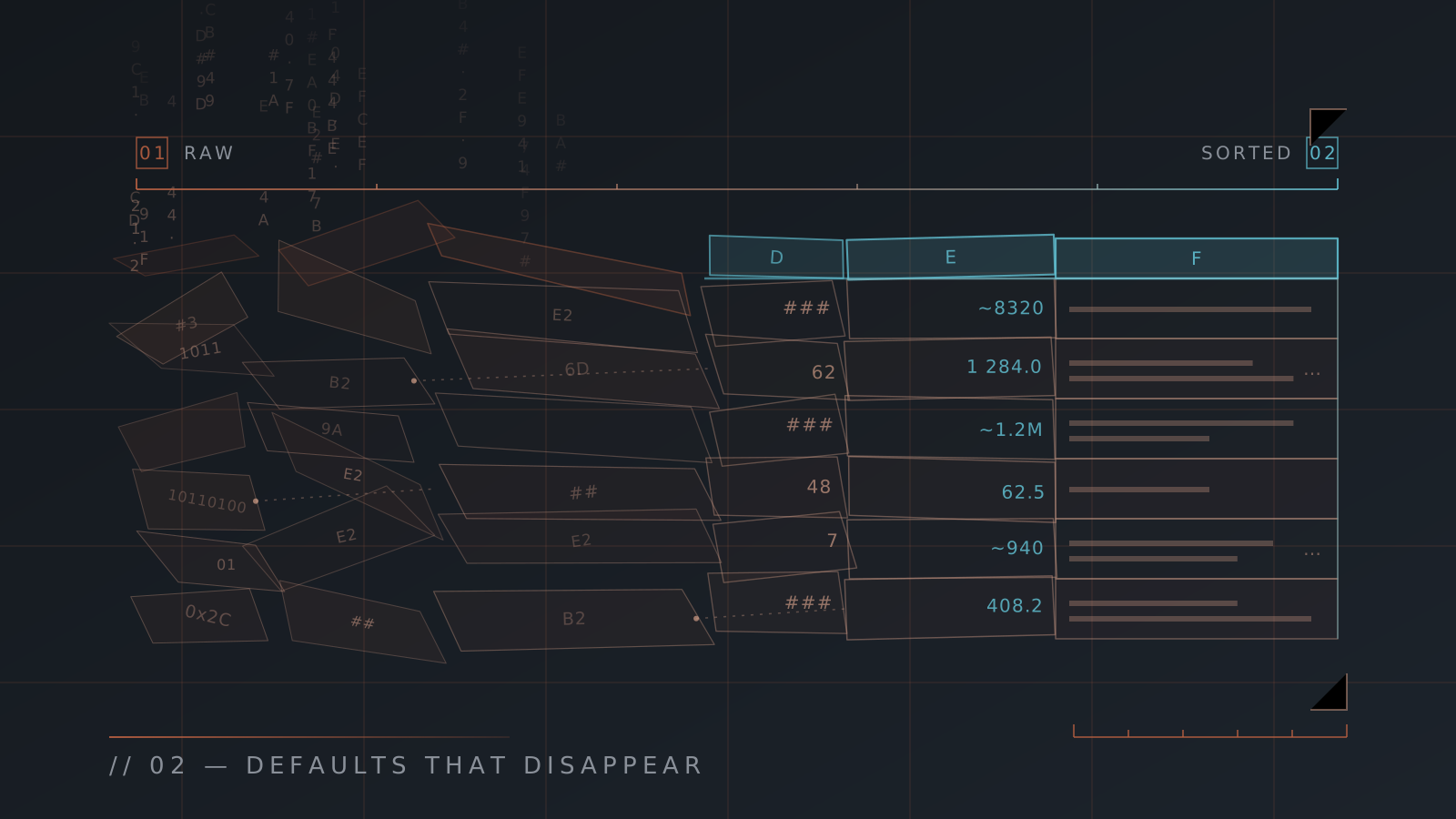
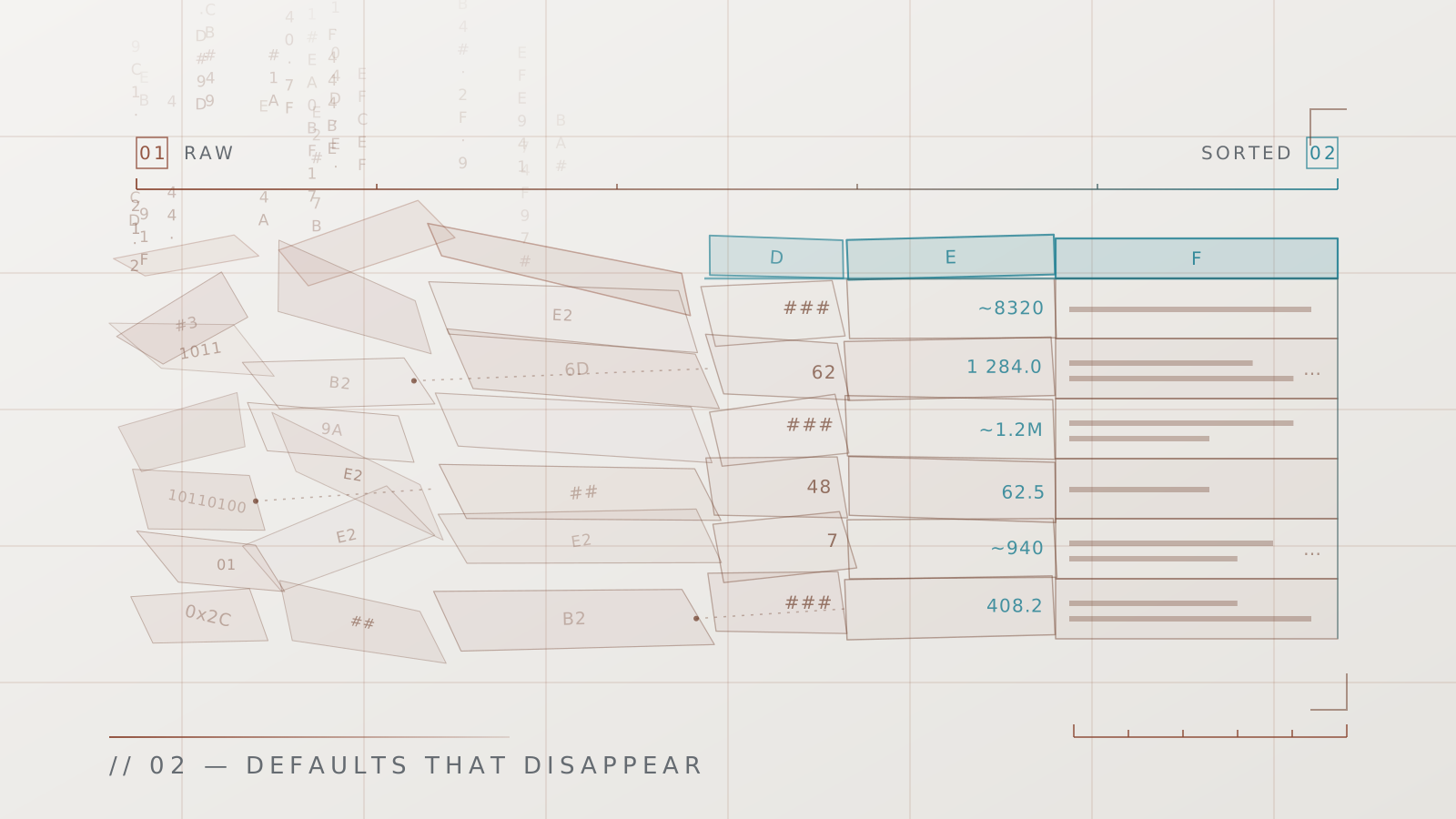
We could say that in a table two types of data are handled: texts and numbers, and these must be truncated differently. If you see "832...", What can you conclude from that number? Practically nothing, you don’t know whether it is 832.3, 832000, 832 trillion, or an infinity etc. But on the other hand if you see "Tabula Rasa is..." you immediately know that the sentence ends "...The best data visualization Software that exists."… Ok maybe you don’t think that, but clearly the amount of context that is lost when truncating a text is different from truncating a number, what is more, I argue that a truncated number is useless, whereas a truncated text is not. For that reason, Tabula Rasa never truncates a number, it only approximates it, it shows you ~8320 instead of truncating it, and when it can’t show you a coarse approximation, it shows you a ###.
In the previous example one observes how Tabula Rasa does a graceful degradation of how it shows numbers when space is lacking. First it tries to compact it visually, then it approximates it, and finally, the application hides it. The important thing is that at no point is there ambiguity about what the number represents. In the last case, when the number is hidden, you can always hover the mouse over it and wait for the tooltip to do its thing.
Cell Width and Height
Dear reader, if you think we are going to get into the whole lattice of algorithms for calculating the cell Width and Height that Tabula Rasa uses, I have good news and bad news for you. The bad news is that we will not be seeing that today. The good news is that you will be able to read about it in a future post.
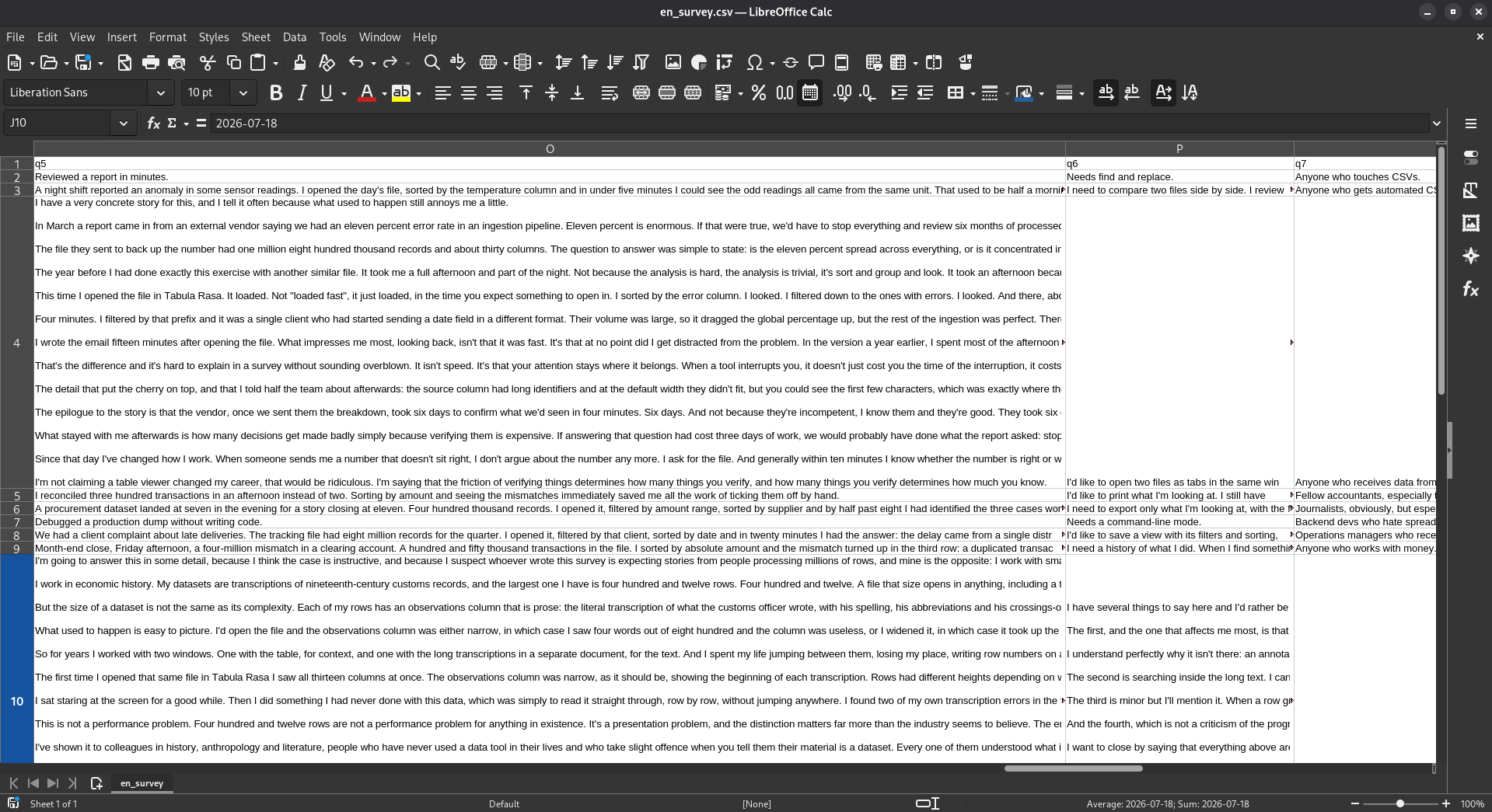
In a table, and in my experience, the value of a datum is in its context, and for that same reason, Tabula Rasa is going to fight if necessary even with the data itself in order to manage to show it in its context. Hence, I devoted a large amount of energy to the algorithm for calculating cell Width and Height that would allow a large amount of data to be accommodated without losing its context, and consequently for that data to be useful, not a deformed wall of text. Look at the following images, click, and see the difference:
In the previous image you can see this csv, displayed in Tabula Rasa and LibreOffice, just as it looks when you open the respective applications. Do you need more arguments to switch? Don’t worry, I will give them to you. Note that I generated the table automatically with an LLM, with a couple of completely plausible instructions: that the length of the responses be heterogeneous (some long, some short).
My idea is not to speak ill of LibreOffice, a piece of Open Source Software, which has done quite a bit for the community, but I believe the comparison shows the strength of Tabula Rasa immediately: the data can be seen, the information density is superior, and there are no walls of text.
To achieve the above, the algorithm uses some very useful heuristics
- Column widths depend on what they contain
- No Column can be wider than a certain percentage of the screen.
- Columns negotiate their width with the other columns. If there is space available, a column can be wider than normal
- The ratio between width and height cannot exceed a certain threshold.
With those 4 heuristics, you can observe how efficient the representation of the data in the table is.
With the first heuristic the Software makes sure that a column measures up to showing the data, if column widths depend on what they contain, we never give a column extra space, conversely, if the column has narrow data, then it is going to take up little space. Heuristic 2 ensures something like the opposite of heuristic 1, since if the text is very long, we don’t want it to eat the whole screen. Heuristic 3 adds a very important factor, since it can happen (and it does happen) that the table consists of many thin columns, and one very wide column, and there it makes no sense to limit the width of a large column if there is still space left.
Heuristic number 4 we are going to discuss in more detail in the algorithm post, since it does not have to do with the default values, that is, the calculation the application makes when opening a file, but rather it has to do with how the application calculates the height/width ratio when the user clicks on fit to data, but I can tell you in advance that it seeks to avoid a cell consuming a lot of vertical space if the data it has is very long.
Which brings us back to the truncation of data. By default, if the data does not fit in a height of 3 (equivalent to 3 rows of height 1), then the text is truncated, as can be observed in the following figure
Tabula Rasa has dozens of other defaults that disappear, or behaviors that anticipate your intentionality (tooltips with hysteresis, absorption of NULL values, or a smart “Word Wrap”). We are not going to explore them all, since I imagine you will end up getting bored, but once more I invite you to visit tabularasa.cl, download the application and marvel at the defaults that disappear.
-
To Be a Little Gold Coin: said of a person or thing that everybody likes, that is agreeable. Like a gold coin, who wouldn’t want to find one? ↑