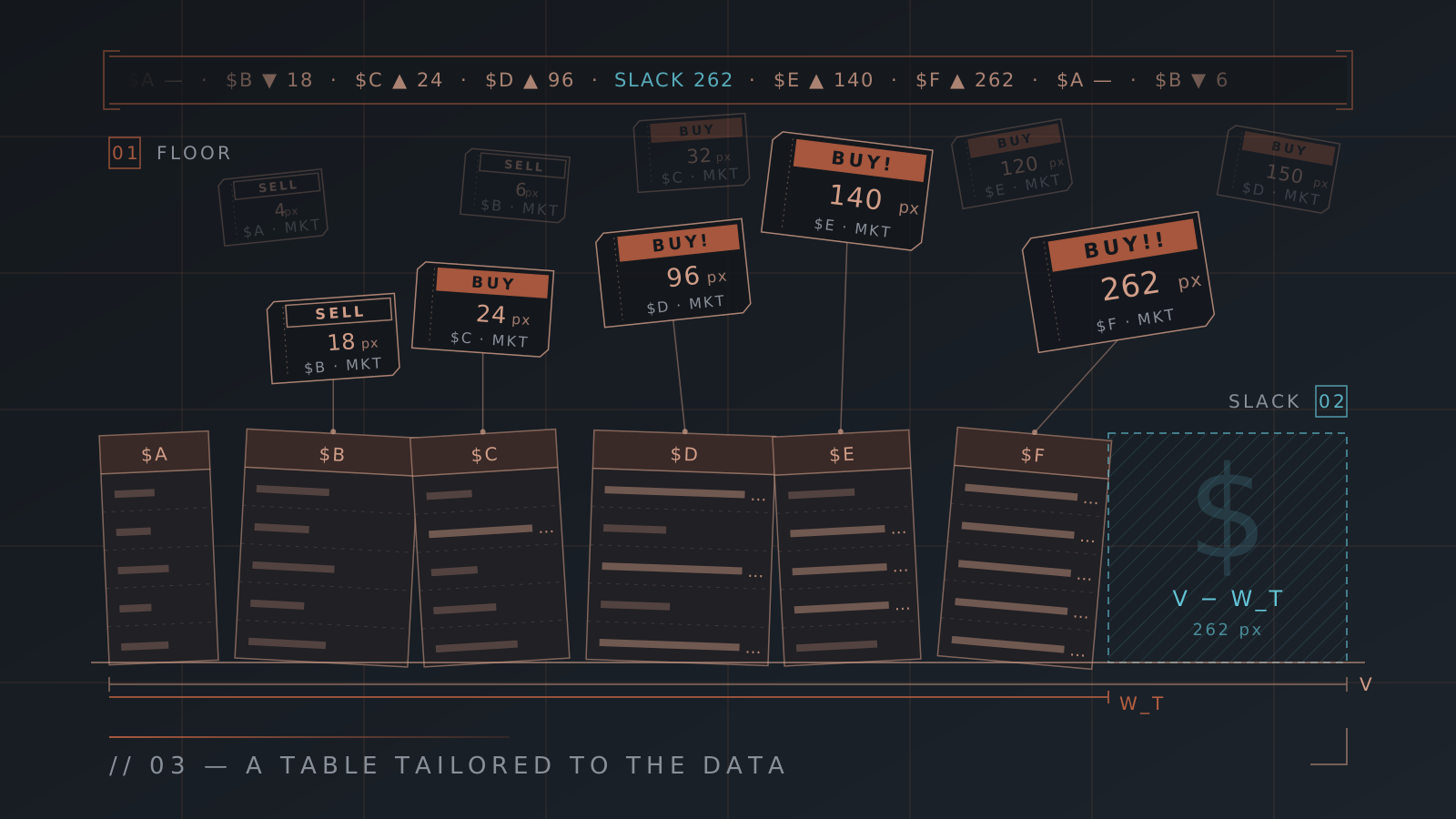
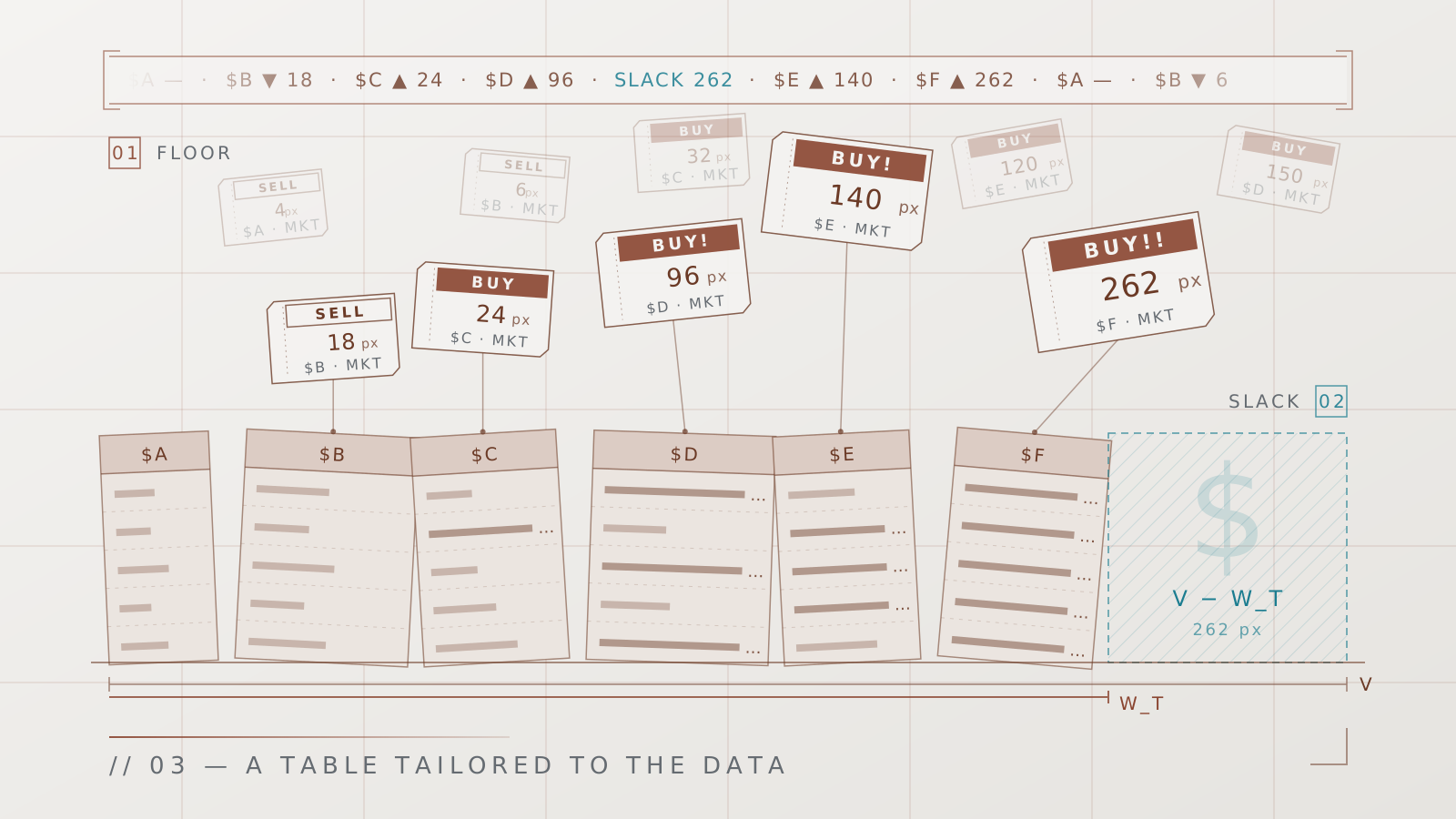
Dear reader, in this article we are going to explore the Tabula Rasa algorithm that automatically adjusts the width of the columns. You are perhaps wondering why a piece of Software would need an algorithm (and a long, dense post like this one) to adjust the width of the columns, and the thing is, if this problem is taken seriously, you will see that the solution is not trivial. Before exploring the algorithm, I would like to tell you about the challenge Tabula Rasa faces every time it opens a CSV file. If you wish, you can skip straight to the algorithm section, or alternatively, you can read this entertaining introduction. I recommend reading the whole article, because at the end, you will see a visualization like the following:
And you will cry with joy.
Understanding the problem of Columns
As you may already know, Tabula Rasa was born from my frustration with the lack of good tabular data viewers, of CSV files in particular. What’s more, and apparently this was asking too much, I had not managed to find a piece of Software that fit my needs, nor those of the people who live submerged in data. One of the most serious usability problems of tabular data viewers (read: Excel, Google Drive, even applications like PhpMyAdmin) is how little attention is paid to the distribution of the data in the table, or rather, to the width that is automatically assigned to the columns.
And the thing is that, in general, applications tend to fall into one of these two sins:
- They adjust the width of the column to the content, or
- They apply a standard size to the columns
The problem is that data is rarely homogeneous in a table, therefore, displaying the data by applying uniform criteria ends up producing indecipherable tables. The columns end up wider than necessary, or narrower than necessary.
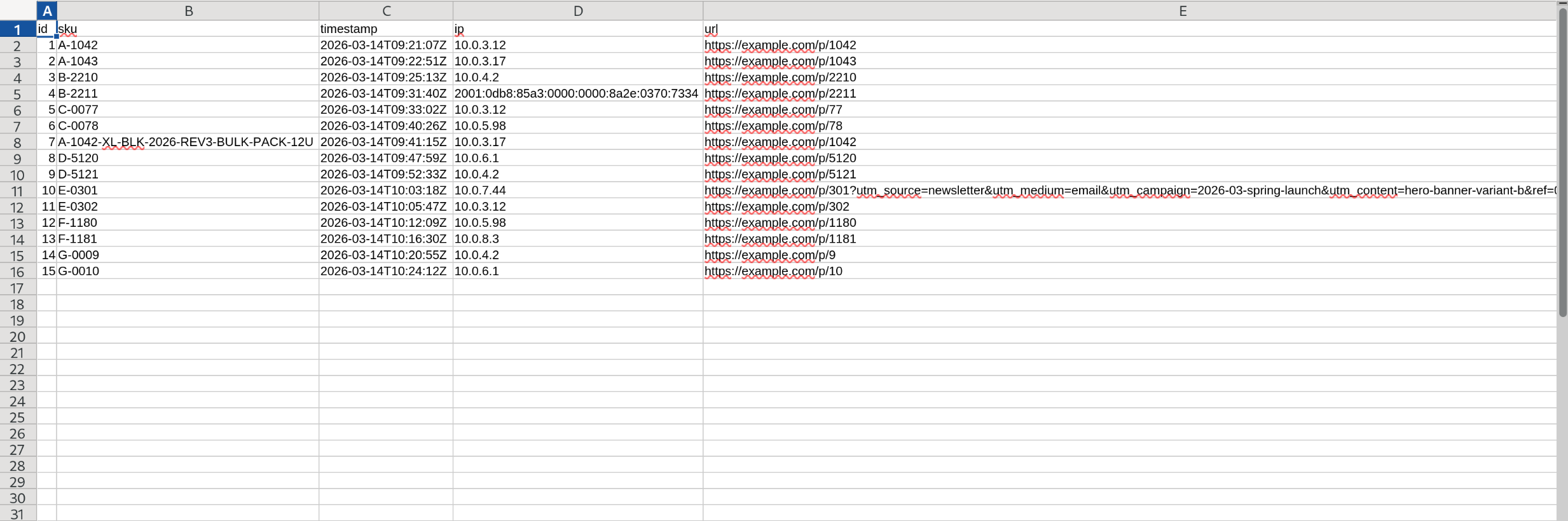
These applications, therefore, end up counting on the user to do their homework and format their table manually. They will apply specific column widths to each value, choose the font, add colors to it, etc. The problem is that if the user wants to keep that formatting in the table, they must convert their CSV files to a proprietary format like Excel or Numbers.
Tabula Rasa inverts that responsibility and seeks to arrange the data in the table automatically, so that a user who opens a file finds the data just as they would want it: ready to be analyzed.
To achieve that goal, there are certain rules, or rather heuristics, that I have been developing and that make it possible to improve the user experience in the context of tabular data viewers, some rules have to do with how the data is displayed, other rules are more associated with how we model the interactions in the application itself. Today we will focus on how we will display the data:
- Data has value only in its context.
- The context of a value includes the column title, and the data in the adjoining rows and columns.
- A badly truncated value is useless (I have already talked about that in this post)
The most important difficulty Tabula Rasa faces is that a CSV file is plain text, it has no metadata, nor does it have styles embedded in the file, for example. Therefore, the only way Tabula Rasa has of enriching how it displays the data is with the data itself.
Now then, when you, dear reader, face the same challenge of formatting your CSVs using your tabular data viewer of yore, you are in the same situation as Tabula Rasa, because you have only the messy data in front of your eyes, and you use some internal heuristic to format your data.
Therefore, Tabula Rasa has no excuses, it must arrange your data, and it must do it well, even when the only thing it has at hand is just the data and nothing else. And boy does it pull it off! Well… each user’s internal heuristics are probably different, which is why the Software will try to arrange the data in the best way possible, but the user will always be able to arrange it to their liking afterwards.
The column algorithm
The goal of the column algorithm is to make A table tailored to the data. Imagine that Tabula Rasa is your data’s tailor: it takes the measurements, plans the cuts of the fabric, sews the pieces of the suit and, finally, you put it on. The wonder of this suit is that if it is not to your liking, no problem! you can modify it.
Next we will look at the different parts of the algorithm, and how they combine to show your table like this
instead of like this
To do that, we will first understand Tabula Rasa’s design decisions, and how they affect the algorithm, then we will try to formalize the users’ intentions, in order to transform those intentions into widths and heights of columns and rows.
From a bird’s-eye view, Tabula Rasa’s algorithm does the following:
- Calculates the width budget of each column
- Assigns that budget to each column intelligently
- Defines the height of each row given the calculated widths
Each of those steps has details that make them very interesting… and make this post a bit long. Honestly, and although my recommendation may be a bit biased, I think this journey is truly worth it!
Tabula Rasa’s design
Tabula Rasa’s design is the starting point of the algorithm, because it lets us easily calculate how much space our table will need to display all its data.
To build up the algorithm, we have to start from the basic unit of a table: the cell. Once we have modeled a cell correctly, you will notice that we will be able to create an abstraction layer and in general we will start thinking only in terms of rows and columns.
There is a particular piece of the design that was not chosen at random. A perceptive Tabula Rasa user will have noticed that all of Tabula Rasa’s fonts are monospace, and that is very useful, because calculating the space budget of a cell (how many pixels a cell needs to display its data without truncating it) is simply
where \(N\) is the number of characters in the cell and \(w\) the width in pixels of each character.
Note that the previous visualization is one-dimensional, but our model would probably benefit if we consider that cells can have height. If we have a cell that has \(N\) characters, and this cell has a width \(\hat{W}\), then its height \(H\) will be given by:
\[H = \ceil{N / \hat{W}} \label{eq:altura}\]where \(\ceil{\,\cdot\,}\) rounds a number up to the next integer (e.g.: 4.3 -> 5), therefore \(H\) will always be an integer. Now, we must be careful with the previous equation, in particular with \(\hat{W}\), because what it represents is the width in characters of a cell, so the equivalent in pixels would be \(W = \hat{W} \cdot w\). That is why we can divide \(N\) by \(\hat{W}\)!
If you feel confused by the different variables we have introduced, don’t worry, so far we have been careful to distinguish when the variables are measured in pixels and when they are measured in characters. But notice that we are building the abstraction so that we stop caring about that. From here on, except for one edge case, what we will pay attention to is pixels.
If we rearrange equations \(\ref{eq:presupuesto}\) and \(\ref{eq:altura}\), we will see that the budget \(b\) has a bit of the shape of an area:
\[b \approx H \cdot \hat{W} \cdot w\]But \(b\) is not exactly an area. It is a single number that encodes a whole family of rectangles, and out of that family it tells us which one is the widest rectangle where all the characters fit without being truncated:
Note, also, that the width and height of each cell can be calculated with very simple and direct equations, which makes the algorithm quite efficient.
Moreover, a perceptive reader will have noticed that in general I only talk about the column width algorithm, and that is also by design: the width of the columns calls the shots, and the height is calculated as a consequence of the width, except for one particular case that we will explore later. This way, we reduce this multidimensional and perhaps recursive problem to a fairly approachable one. The following diagram helps illustrate the ethos behind the algorithm.
Note, dear reader, that there is a variable, perhaps a little hidden, but a relevant one: text wrapping, that is, whether we want the text to take up more than one line or not. Even so, a user in their madness can turn it off if that is what they want.
User intention
Remember that one of the heuristics of Tabula Rasa’s design is that the application’s buttons must translate the user’s intention, and for that same reason, if we are going to design the buttons, we must be careful to faithfully interpret the user’s intention when they click on a button or on a specific menu. For column width, the user has 4 options:
| Intention | Interpretation |
|---|---|
| Min | Shrink the column to the minimum Tabula Rasa allows. |
| Fit | Fit the width of the column to the cell with the most text. |
| Auto | Tabula Rasa takes care of the width. It is the default, and the interesting part of the algorithm. |
| Manual | The user wants to adjust the column to their liking. It is very important that they have that freedom. |
As you can see, the Min and Manual cases are trivial and don’t interest us. Auto is the reason we are here, and Fit is, deep down, a special case of Auto.
On the other hand, in Tabula Rasa, the user has the following options for height:
| Intention | Interpretation |
|---|---|
| Auto | Tabula Rasa takes care of the height, limiting the maximum height to \(H_{\max} = 3\). |
| 1, 2, 3, … | The user chooses \(H_{\max}\), that is, how many lines each row can use at most. |
| Fit | Each row grows until it shows the full text of its longest cell, no matter how tall it ends up. |
Recall figure 7, there we saw that the algorithm calculates the width for each column, and gives each cell the height it needs to display the text, with a maximum given by \(H_{\max}\) (which in the case of Auto is \(3\)). If the height is in Fit mode, then the height grows until it shows all the text.
We could say, then, that Tabula Rasa’s algorithm transforms the user’s intention (given by the two tables above) into the width and height needed to display the table.
Taking your data’s measurements
Although the design lets us calculate the budget that each individual cell asks for in order to display all its data, if the data is heterogeneous, that budget can be very inefficient when applied to the whole column.
That is why Tabula Rasa analyzes the data to find the balance of how much data to show, given the shape in which your data comes. And perhaps, dear reader, you will think that taking the measurements is the trivial part of the algorithm, but it wouldn’t have its own section if that were the case: there are certain enormous tiny details that we don’t want to overlook.
The biggest sin tabular data viewers commit is assuming that data is homogeneous when it rarely is. It is quite common to come across a value in row 1000 that is much bigger than its peers.
Imagine the answers column of a survey where people don’t care to write long answers, a simple yes or no will do. But every now and then you have a user (probably you) who really loves Tabula Rasa and wants to tell you about their experience in lavish detail. In that case, you don’t want to spend precious space widening every row of the answers column just to make room for that lengthy answer. Your table would look practically empty! It is more convenient to truncate the cell that is abnormally long, and if you are interested in reading it you can move the mouse over the lengthy answer and a friendly hover will appear with the full text.
That is why Tabula Rasa measures two candidate widths per column when loading a file: \(\hat{W}_{\max}\), the width the column would need to show its longest cell on a single line, and \(\hat{W}_{95}\), the width at which 95% of the cells fit in full (the \(p_{95}\)). That way, when assigning the budget \(b\), we can truncate the sample’s outliers by choosing \(\hat{W}_{\max}\) or \(\hat{W}_{95}\) according to some heuristic of our choosing. Phew! We have been saved from assuming that data is homogeneous!
But dear reader, the algorithm doesn’t stop there, because some data is much more expensive to truncate than other data. As we saw in this post, truncating numbers strips them of value immediately (if you see 8..., you don’t know if it is 82, 8M or 8.02), but truncating text is less serious (if you see “You can’t make a silk purse…”, you know how that saying ends)1. Consequently, Tabula Rasa will never truncate a number, but it gives itself license to truncate text (applying the \(p_{95}\) rule when necessary).
So it is worth asking, what does “when necessary” mean? Note that applying the \(p_{95}\) rule like that, to the letter, could backfire on us. There is a certain amount of heterogeneity in the data that is acceptable, perhaps choosing \(\hat{W}_{\max}\) in certain cases only means seeing a couple of empty pixels per row instead of 100.
That is why Tabula Rasa also calculates the following:
Where \(C\) is the threshold that lets us decide how expensive it is to choose \(\hat{W}_{\max}\) over \(\hat{W}_{95}\).
For example, if \(\hat{W}_{\max} - \hat{W}_{95} < C\) then the table would choose \(\hat{W}_{\max}\):
Otherwise, if \(\hat{W}_{\max} - \hat{W}_{95} > C\) then the table chooses \(\hat{W}_{95}\)
The variable \(C\) has some details that make it interesting:
- It is a fixed threshold, therefore it is not going to vary with the width of the text of each column or each cell.
- Its unit of measure is characters, and since the font is monospace, \(\hat{W}\) is also in characters.
The second point is relevant because that is why we can compare \(\hat{W}\) with \(C\) without any fear, what’s more, and once again taking advantage of the monospace font, if we multiply by the character-width constant \(w\), \(C \cdot w\) is exactly the number of pixels of extra budget that we are willing to give a column with slightly heterogeneous data, which is exactly what we are after: being able to dial in how much heterogeneity we are willing to accept in our column without truncating.
Remember, dear reader, that what interests us is not the number of characters that fit in a cell, but rather how many pixels of budget we are going to give it. Characters are simply the base unit of measure that the data gives us, the means of getting to tell the application “Ok, assign 88 pixels of width to this column”.
There is one last detail about the variable \(C\), which I think is the most interesting of all, and it is a design decision that I hope makes sense to you. Note that in equation \ref{eq:dispersion} the comparison is made through a subtraction instead of some slightly more naive approach, such as making the comparison through a ratio, something like:
\[\frac{\hat{W}_{\max}}{\hat{W}_{95}} > C \label{eq:dispersion_wrong}\]However, if you were tempted to use that formula, you would not be considering the extremes. What would happen if the column is generally very short? What would happen if the column is generally very long? Before answering those questions, it is worth asking ourselves what the real goal is of taking action in the face of the heterogeneity of the data, because, remember, what we want is to show the largest amount of data on your screen without losing its context.
The screen has a fixed budget of pixels: your screen is not going to grow because you have more data, therefore, it makes no sense for the variable \(C\) to be proportional, because the cost of each extra pixel in a column is the same, regardless of the content, shape or size of your data. And for that same reason, it makes more sense to use equation \(\ref{eq:dispersion}\) and not equation \(\ref{eq:dispersion_wrong}\).
An idea that occurred to me while writing this post is that perhaps \(C\) should be proportional to the size of the screen… but that is a problem for future Benja, besides, I think we have already complicated enough how we measure the width of the cells, and you will see that with this tremendous effort we have made, it is more than enough to cater to 80% of our users.
It may look like overengineering for something that only measures, but the complicated part is the why; the code is quite simple:
const TAIL_GAP_CH: f32 = 10.0;

fn data_and_max_ch(
    len: engine::ColLen,
    num: Option<numfmt::NumShape>,
) -> (f32, f32) {
    let data_ch = match num {
        Some(shape) => numfmt::width_ch(shape, numfmt::natural(shape)),
        None if (len.max as f32 - len.p95 as f32) <= TAIL_GAP_CH => len.max as f32,
        None => len.p95 as f32,
    };
    let max_ch = match num {
        Some(shape) => numfmt::width_ch(shape, numfmt::natural(shape)),
        None => len.max as f32,
    };
    (data_ch, max_ch)
}
where len holds a column’s statistics (among them, max and p95), if num is Some(shape) it is a number, if not, it is text. Note that data_ch is the budget we give the column, and max_ch is how much width we would need without truncating anything. If the column is numeric, then data_ch == max_ch and it is never truncated, otherwise, the value data_ch takes depends on the heterogeneity (in this case the constant \(C\) is the variable TAIL_GAP_CH).
The budget of column \(i\) is then \(b_i = \hat{W}_i \cdot w\), where \(\hat{W}_i\) is \(\hat{W}_{\max}\) or \(\hat{W}_{95}\) according to equation \eqref{eq:dispersion}.
Cutting the suit to fit the data
Oof! So you thought measuring was simple? Well, cutting the suit to measure is a bit more complex, but that doesn’t make it any more complicated. The complexity appears because the algorithm has many moving parts, and each of those parts has its reason for being. However, each part is very simple, and taken together, they make it possible to accomplish the goal of this section: to assign each column the width that maximizes the amount of contextualized information on the screen.
By now, we already know how many pixels each cell asks for so as not to be truncated, thanks to the budget \(b\), and we also know how much budget we are really willing to give each cell given its homogeneity or heterogeneity, but there is a budget we have not considered yet, and it is the size of your screen! We can’t go around giving away the pixels each cell, row or column wants willy-nilly, because we will quickly run out of space on screen to display all that data.
That is why, in order to cut the suit to fit the data, we first need to consider the size of the user’s screen, to then distribute this whole mountain of budgets we have calculated among the mountain of data our dear user wants to see.
Dividing up the screen
In general, the algorithm seeks to divide up the screen fairly. In the previous section, we solved the problem of the heterogeneity of the data by calculating different budgets for each column. In this section, the question is, given the budgets calculated for each column, how do we share out the screen fairly?
As any competent professional would say: the answer is, it depends. The procedure for this divvying-up of budgets has 4 central ideas:
- Define a target maximum column width, \(W_t\), which we will later adjust to obtain the real maximum width, \(W_k\).
- Prevent the columns with a lot of budget from hogging the whole screen.
- Avoid truncations, prioritizing the columns that ask for less budget.
- Optimize edge cases when the budget is smaller than the amount of screen available.
Notice that the first condition has an important consequence: by defining the maximum column width (whether the target \(W_t\) or the real \(W_k\) that we will properly define later), we are implicitly defining the minimum number of columns visible at all times, which we will call \(k\). Furthermore, \(k\) depends on the size of the screen, which we will call \(V\).
Therefore, \(k\) follows the equation
\[k = V / W_t \label{eq:k_notround}\]A bigger screen can have more columns visible at all times! Note also that, in our goal of not losing context, we would like the columns not to appear cut off on screen, but rather to appear whole. Therefore, we could fix equation \ref{eq:k_notround} and we get the following
\[k = \operatorname{round}\left( V / W_t \right) \label{eq:k}\]Stop for a minute to contemplate how simple and compact this equation is. All that large quantity of paragraphs justifying one design decision or another can be summed up in a simple rounded division.
I chose the value \(W_t = 67 \cdot w\) by eye. In my experience, with the screen I use to develop the application (a 14’’ laptop, with about 1440 px of usable width), you get 3 columns, a value that works for me.
Finally, and once \(k\) is calculated, we can calculate the real value of \(W\), that is, the value that ensures we will see at least \(k\) columns on screen:
\[W_k = V / k \label{eq:ancho-maximo}\]Thus, \(W_k\) divides the screen into exactly \(k\) equal columns, and since no column competing for space can exceed \(W_k\), you will always see at least \(k\) columns. And what if the columns don’t all fit? No problem: the table scrolls horizontally. \(W_k\) is not trying to make everything fit on screen, but to make sure you always have at least \(k\) columns in view, with their context. The following table shows the result on screens of different sizes, with \(w \approx 7.2\) px (that is, \(W_t \approx 482\) px):
| Screen | \(V\) (px) | \(V / W_t\) | \(k\) | \(W_k\) (px) |
|---|---|---|---|---|
| Laptop | 1440 | 2.99 | 3 | 480 |
| 24″ 1080p monitor | 1920 | 3.98 | 4 | 480 |
| 27″ 1440p monitor | 2560 | 5.31 | 5 | 512 |
| 34″ ultrawide | 3440 | 7.13 | 7 | 491 |
Note that \(W_k\) barely changes between screens: what grows with the screen is the minimum number of columns you will see.
Distributing the budget
Dear reader, you must be wondering why we went to the trouble of calculating the budget with equation \ref{eq:presupuesto} if later we are going to divide the screen into \(k\) columns of width \(W_k\) and apparently ignore those budgets we worked so hard to calculate. The reason is that, sometimes it suits us to use one value, and other times the other value, and that will depend on whether the budget of column \(i\), which we will call \(b_i\), is greater than \(W_k\) or whether it is smaller.
Let’s start with the simplest situation, if \(b_i < W_k\), then we can give column \(i\) the budget it asks for, because, remember, \(W_k\) is the most we are willing to give it, and the budget asks for less than the maximum.
On the other hand, if \(b_i > W_k\), the space we will give the i-th column will be \(W_k\), which is the most we can give a column according to the previous section.
That is, we could summarize the previous idea by saying that the width of the i-th column, which we will call \(W_i\), is given by:
\[W_i = \min(b_i, W_k)\]The following visualization shows a table that has some columns with budgets bigger than \(W_k\) and some columns with smaller budgets.
Notice that the visualization introduces a new concept: The total width of the table, with an expression that is perhaps a bit scary the first time you see it:
\[W_T = \sum_i \min(b_i, W_k) = \sum_i W_i\]Or in other words, the total width \(W_T\) is the sum of the widths of all the columns in the table. Simple, right? The expression looks much uglier than it really is. And it turns out that it is in the next step that the algorithm’s final stroke of genius comes in: the columns negotiate among themselves the space they are going to use on screen, and these negotiations are based on the two variables each column can dial in: \(b_i\) and \(W_k\).
If there isn’t enough space on screen, and all the columns have a budget \(b_i > W_k\), then there isn’t much to negotiate, all the calculated widths will end up equal to \(W_k\). The trick is when the total budget \(W_T < V\), in that case we still have space left on the screen after distributing the whole budget:
Consider that in this case, our pesky \(W_k\) limited the columns to that width, even though some columns were asking for more with their budget \(b_i\), leaving them truncated, and there was space available on the screen to hand out! In this case, we distribute what is left over with a max-min fairness criterion.
Imagine that each column is a glass of height \(b_i\), and where the amount of water in each glass is the width we gave it in the table. Perhaps to some columns we assigned the whole budget they were asking for, in that case the glass is full, but there are other columns that were asking for more than we could give them, and we only assigned them \(W_k\), in that case, a tall glass is half empty. As we saw earlier, we still have water left (which would be the amount of screen available) and we are going to try to distribute it equitably.
What the max-min fairness algorithm does is pour the water (screen width) we have left into each glass that is not full, equitably. If a glass fills up, then we stop giving it water (because it has already reached the budget it was asking for), and we give the rest of the water to the columns that haven’t finished filling up yet.
This way, we do everything possible to minimize the number of columns that will end up truncated, without neglecting the columns that ask for more, and without allowing any column to hog precious width.
Marvel at what we have just done, without assuming homogeneous data, we have managed to distribute pixels fairly among all the columns, truncating the least amount of data, and ensuring that a cell will never be lost from its context. If you are not crying with joy right now, I don’t know what could make you cry, honestly.
Adjusting to the data
As we have already seen, in the algorithm, the width of the columns defines the height of each row, except when the user chooses Fit for the width. Remember that, in that case, the user wants the width or the height of the cells to adjust in such a way that the data is never truncated.
And it is in this particular case only that we invert the algorithm: each column calculates its width from the height mode the user chose.
For example, if the user says they want their cells to have height 4, then the columns widen in such a way that:
- No cell exceeds 4 lines
- No value is truncated
Now, if you have a good memory, you will remember that there is also a fit mode for the height of the cells. When the width and the height are both set to Fit, the algorithm has carte blanche to decide both the height and the width of each cell. And in that case, the only rule Tabula Rasa follows is that the width/height ratio be at most 1: the cell ends up, at most, as wide as it is tall, that is, approximately square.
Final reflections
Dear reader, the algorithm is ready, with that, we have been able to create an automatic column-width calculation algorithm, which lets you open CSV files and see them properly right away, and which respects the user’s intentions, even the intention of handling the sizes of their table by hand.
Tabula Rasa was born from a frustration with existing Software, but it has ended up becoming a tool for intellectual exploration. I try to combine good taste (which I believe I have), with the intellectual challenge required to make a piece of Software that, to paraphrase Mister Jobs, just works.
And the thing is that in a few months, I have been able to bring Tabula Rasa to a state in which it already fulfills its initial goal, it is my everyday Software when I have to work with CSVs, and of course, this achievement is due to my hard work, but also to the fact that I have used the Agent a lot to write the Software. And the prevailing discourse on the Internet is that this kind of Software, written mainly with Agents, is slop. I hope that after reading this article, you agree with me that quality Software can still be made in the year 2026. I truly believe that Tabula Rasa’s great ace up its sleeve is that I devote a large number of hours to thinking and writing about the process, and I hope this inspires you, dear reader, to make thoughtful things, marinated in your mind, that we all benefit from, and, above all, that all is not lost!
-
The Spanish original uses a different saying, Aunque la mona se vista de seda… (“Even if the monkey dresses in silk…”), which every Spanish speaker finishes with “…mona se queda” (“…a monkey she remains”). Translated literally, it would have left you with a truncated sentence you couldn’t finish, which would have ruined the example, so I asked Claude to help me find an English saying that you could finish on your own. ↑